//https://www.youtube.com/watch?v=APNWCe56cQA

Tuesday, January 16, 2024

How to create new EC2 machine using existing EC2 instance in AWS

If you are an AWS user working with EC2 instances, there is a high chance of needing to clone existing EC2 instances. The steps below describe the way to achieve this.

Navigate to EC2 Console page

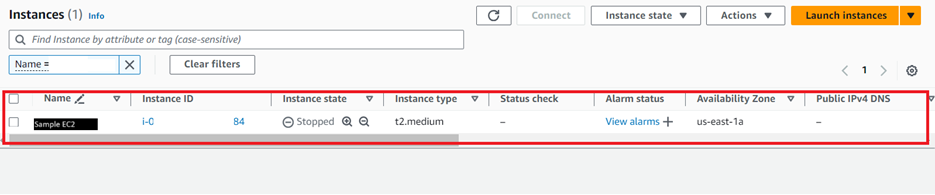
Find and Navigate to the EC2 instance that you want to create clone

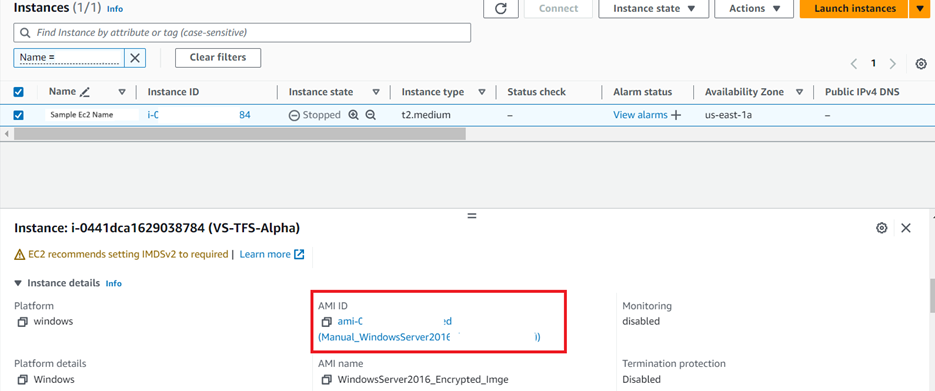
Under the details tab in the bottom window navigate to the AMI ID. Next Click AMI ID link

This will open the “Amazon Machine Images” page

Here, either right-click on the image in the list box and select “Launch instance from AMI” from the menu. Alternatively, just select the image and click on “Launch instance from AMI” on the top-right side of the page.

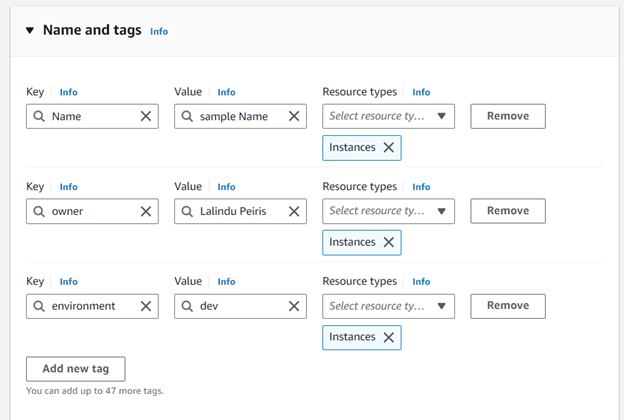
In the next window, first, fill in the necessary tags, including the name. Tags help to easily filter and find EC2 instances.

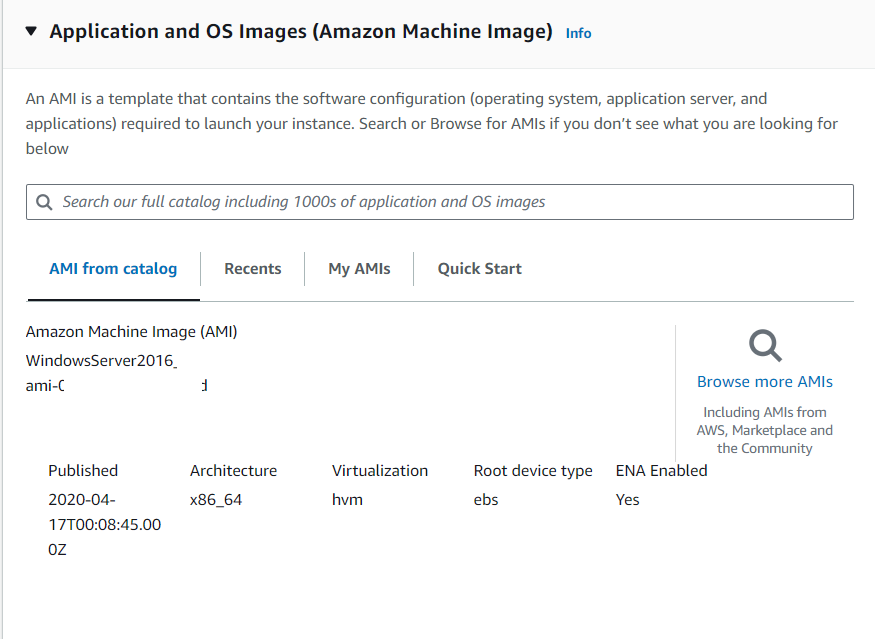
Next, select the necessary OS specifications. Do not change this if you desire to have similar specifications as the existing EC2 machine.

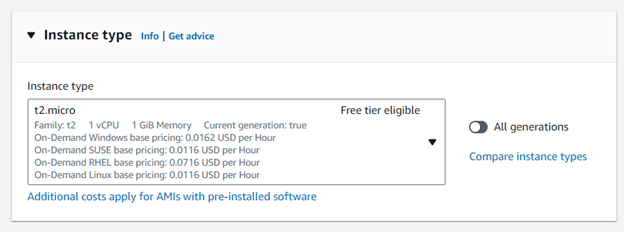
Next select the type of EC2 machine

Next, provide Key pair details. This helps securely log in to the new EC2. It is possible to use the existing Key pair that was used for the existing EC2 machine. Create a new key pair if you wish to have new security specifications for the new EC2 instance.

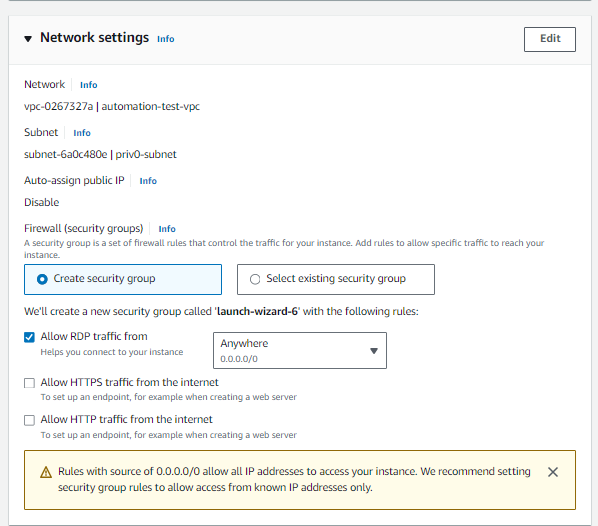
Next, fill up the network settings. It is possible to either select existing network settings or define new ones for the new instance. Make sure to set the right access level based on requirements. For example, if public access is required, necessary changes have to be made here.

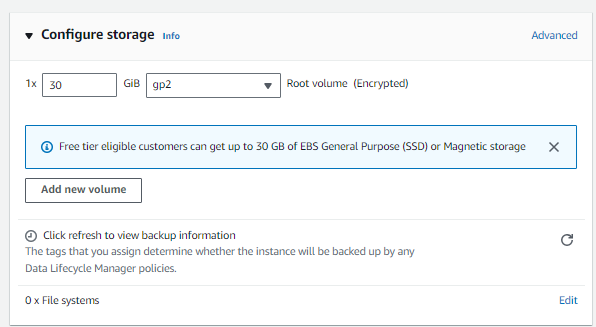
Finally, fill in the hard disk size of the new EC2 instance. This can be adjusted at a later stage as well.

Once all are set click on “Launch instance” button on the right side panel

This will create your new copy of EC2 instance 

Monday, January 15, 2024

Optimizing Your Release Process with Agile Principles


You can hit a nail with a hammer; alternatively, you can use a piece of wood or stone. Both will yield the expected outcome, but there is a high chance of failure with the second method. Similarly, a process is not an essential but a convenient tool that makes work easy and yields precise results.

When it comes to release planning and delivering processes, we can think about something similar. There are many ways that we can deliver a successful release. Nowadays, agile-based software development and releases are common and proven in the industry. Below is how we’ve done it successfully over the years.


Identify a Tentative Release Date:

  • In an agile environment, most companies do not depend on strict deadlines to release a product.
  • With the aid of PI planning, backlog, and sprint planning, the target release date is identified while maintaining a release-ready product in each sprint cycle.
  • The importance of this process is that it always provides what stakeholders require and avoids obsolete requirements and functionalities.
  • The development team plays a pivotal part in this process and serves as the main decision-makers on release.
  • There is an assigned person to perform releases, either within the team or from outside.
  • The development team should constantly communicate with this release manager and identify a probable release date.
  • If the team is working on an ongoing project, it is good to identify the next release date once each release is completed.
  • This date can be adjusted later based on other factors, such as new feature requests, bugs, or any unforeseen changes.
  • It is important to keep all stakeholders informed about the release content and date.
  • The easiest way to do this is by creating a release ticket in a ticketing system such as Jira or Azure DevOps.
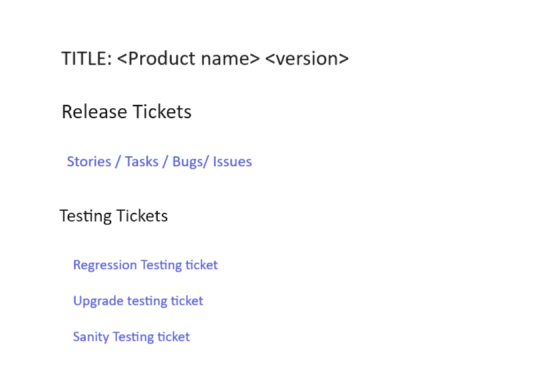
  • This ticket should contain all the stories, issues, and bugs related to the release.
  • The release expert owns the responsibility of managing this ticket.
Composition of the release ticket

Add Completed and Potential Tickets to the Release Ticket’s Description and Link Them:

  • In an agile environment, changes are common, with sudden feature requests, change requests, or bugs added to the release intermittently.
  • All these should come as new tickets and be mentioned or linked into the release ticket.
  • Each Bug or Story ticket should consist of at least two sub-tickets named development and QA testing.
  • QA testing is equally or even more important than the dev task. It is important to validate the intended feature or fix properly implemented in the product.
  • Meanwhile, it is useful to make sure that the new addition does not break the existing functionality of the product.
  • Sometimes there could be additional tickets, such as UI/UX identification/validation tickets or research tickets.

Tickets that could be included in the release ticket:

  • Pre-planned stories/bugs/issues
  • Newly added stories/bugs/issues
  • Testing tickets — Regression/Sanity

Confirm the Release Date:

  • As the release date approaches, consult with the release expert to confirm the date, considering priority tasks and other releases.
  • For example, the dev team could work on multiple products, so the release date should be planned based on the most important product request.
  • It is important to identify any barriers and allocate sufficient time for a smooth release.
  • Also, it is important to constantly communicate with the release expert and confirm the release date while making sure that all expected concerns are addressed prior to the release date.

Regression/Upgrade Testing:

  • Once the date is confirmed, it is possible to create regression and upgrade testing tickets. This can be done by QA members of the team.
  • Once tickets are created, add them to the release ticket under the “Testing Tickets” section and link them.
  • You may already know what regression test is, as its name implies it covers every aspect of the products it ensures all functions in the product work as expected along with new changes.
  • Meanwhile, upgrade testing makes sure that there is no anomaly due to a version upgrade.
  • It is important to ensure that all associated tickets are in the “Closed” status before starting regression testing.
  • If anything unexpected is found while doing testing, it is required to create tickets and decide to address or plan those tickets for a later release.
  • This decision should be taken after a discussion with the product manager, Scrum master, release expert, development team, and other relevant stakeholders.
  • If all is in order, it is possible to complete regression and upgrade testing. While doing it, it is important to add testing evidence in the respective tickets. This provides proof that all testing is done as required with expected coverage.

Release the Product:

  • If everything is in order, the release ticket can be routed for approval, usually given by the product manager or engineering manager based on the composition of the team.
  • Next, the release expert obtains approval and releases the product to the public.

Sanity Testing:

  • The next step is performing sanity testing.
  • A sanity testing ticket should be created and added to the release ticket’s description under “Testing Tickets.”
  • This is not very comprehensive testing compared to regression. This testing confirms that vital functions of the product work as expected.
  • It is important to carry out sanity testing against the production environment as soon as the product is released to production.

The above-explained process is what we’ve used over the years and has been successful as it addresses most concerns in the lifecycle. Different organizations/teams could use a different process for releases. Hope this will shed some light on someone new to this kind of process. If you are a veteran with experience in the software industry, which approach is your team using? What do you think about this process? Comment and share with me so we can come up with a combined robust process.

Monday, January 8, 2024

Code Repository Maintenance: Overview of Git


Maintaining your code repository with Git is like having a superpower for your coding journey. Git isn’t just a storage space; it’s your sidekick, helping you share work seamlessly, fix conflicts, and even travel back in time with versioning. It makes coding with others a breeze, allowing multiple developers to work on the same project without chaos. Git is your backstage pass to the world of efficient code management, ensuring your code dance is always in sync.

In the world of platforms hosting your code, Git has found its home in several popular hubs. GitHub is like a social club for coding, GitLab is an all in one powerhouse, Bitbucket plays well with Jira, SourceForge is a community driven choice, and Azure DevOps by Microsoft offers a suite of tools. These platforms make Git even more powerful, tailoring it to fit different projects and teams.

Let’s explore few frequent used git commands and concepts

Clone: Cloning in Git is like making a copy of your project, ready for some tinkering and experimentation.

  git clone https://github.com/username/repository.git 

Add: The “Git add” stage is like getting your code ready for the big show. It takes your changes and turns them into a masterpiece, ready to be showcased.

 git add file.txt  

Commit: A commit in Git is like taking a snapshot of your project. It captures all the changes and keeps a record of how your code has evolved.

 git commit -m "Add new feature"  

Each commit represents a new version of one or multiple files, meticulously documenting changes. This systematic recording of project states enables developers to navigate through different versions, providing a detailed history of the codebase’s evolution. With each commit, Git empowers teams to track modifications, understand the project’s journey, and seamlessly revert to earlier states if needed. It’s the cornerstone of versioning, ensuring a comprehensive and organized timeline for collaborative coding.

Branch: Branching in Git is like creating different workspaces for your team. It lets developers work on new features without messing up the main project.

  git branch feature-branch  

Merge: Git merge is like blending different branches into a smooth mix. It combines everyone’s work into one cohesive project.

 git merge feature-branch  

Pull: Git pull is like a gentle breeze that keeps your code fresh. It fetches changes from the main project, making sure your version stays in tune.

  git pull origin main 

Push: Git push is like putting your finished work on the stage for everyone to see. It makes your contributions part of the whole project.

 git push origin feature-branch

Fetch: Git fetch is like quietly checking for updates without disturbing your own work. It keeps you in the loop, letting you decide when to merge changes.

 git fetch

Checkout: Git checkout is like having a backstage pass to move between different parts of your project. It gives you flexibility in exploring your code’s evolution.

 git checkout feature-branch

Pull Request: A Git pull request is like sending an invitation for a collaborative dance. Developers propose changes, and if everyone agrees, those changes become part of the main project.

Reverse Merge: Reverse merging in Git is like taking a step back when things go wrong. It undoes changes and brings your project back to a stable version, acting as a safety net. Below example shows steps on how to reverse merge feature-branch with master branch.

 
 git checkout master
 git pull
 git fetch origin master
 git checkout feature-branch
 git merge FETCH_HEAD

Below diagram shows basic sequences of git


As a best practice it is recommended to fork dev branch from master branch and do all the changes in feature branches forked from the dev branch. Once everything ready for release merge dev branch to master and perform a release.

In the journey of code evolution, Git is the conductor making sure everything stays in harmony. Whether it’s creating new workspaces, merging different pieces, or stepping back when needed, Git is your partner in efficient code management. It’s not just a tool; it’s the guardian of your project’s story, ensuring that every change adds to the overall masterpiece. Git is the beauty of collaboration in the ever-evolving world of software development.
Thursday, January 4, 2024

The Art of Process Improvement

If you find yourself knee deep in a long-term project, chances are you've encountered moments screaming for a change in the way things operate. We've all been there! Sometimes, processes age like fine wine, and other times, they're just as outdated as a cassette tape. That's when the superhero of project management steps in process improvement!

Let me share a story from my own journey. We were cruising along, delivering top notch software development and maintenance, only to hit a bump when our client started questioning our quality and efficiency. Surprise, surprise! We had a reality check and decided it was high time for some process improvement.

The process improvement dream team included everyone from management and project managers to our tech wizards. We kicked off by identifying the decision points that needed a makeover. What could enhance our quality? What could make our developers fly through tasks more efficiently? The game plan involved multiple levels of reviews, quality improvement tools, and a truckload of checklists and matrices.

Our journey continued with regular review meetings to showcase progress, gap analysis to identify skill improvements, and a collective brainstorming session with the entire team to fine-tune the process. We kept our client in the loop, sharing the new system and keeping them updated on progress through periodic reviews.

Now, you might be wondering, how can you systematically identify and prioritize processes that need a facelift? Fear not, my friend! Let's dive into some techniques:

  • Stakeholder Engagement:

Identify the key players, keep them in the loop based on their influence, and gather their ideas and concerns.

  • Process Map:

Picture this as your superhero's cape. A process map, like a flowchart, helps identify decision points, activities, and relationships. It's your treasure map to find those bottlenecks and quality hiccups.

  • Swimlane Process Mapping:

This superhero has a sidekick! Swimlane process mapping is perfect when multiple groups are in the mix. It isolates responsibilities, making it crystal clear who's in charge of each process activity.

  • Pareto Analysis:

Meet the wise sage of the improvement world! Pareto analysis helps you identify the top causes or issues to tackle, resolving a whopping 80% of the problems with just 20% of the effort.

So, there you have it! A journey through the superhero world of process improvement. Remember, it's not about reinventing the wheel; it's about fine-tuning it for a smoother ride. Here's to better processes and even better results! 🚀 #ProcessImprovement #ProjectManagement #EfficiencyBoost 🌐💡

Monday, January 1, 2024

Decoding Encryption: Unraveling the Secrets of Secure Digital Communication

 When I was a child, adults had a peculiar way of tricking us and exchanging information without us noticing. This was called "sugar language." They would add "Sugar" as a prefix to a word and then say the word backward. For instance, to say "I ate a toffee," they'd say "SugerI Sugereta Sugereeffot."

This represents the fundamental concept of encryption used in transmitting data between a sender and a receiver. In encryption, keys are employed to transform readable or "cleartext" data into an unreadable format known as "ciphertext." Only users with the corresponding keys can decrypt the message, and the act of reading the message is called decryption.

Today, we commonly use two main methods of encryption: Symmetric Encryption and Asymmetric Encryption. Symmetric encryption is akin to using the same secret language between two friends. It involves a shared code that only those with the key can comprehend, ensuring private and secure messages. An example algorithm for symmetric encryption is the Advanced Encryption Standard (AES).

In C#, you can use the RijndaelManaged class for symmetric encryption. Below is an example of how you might generate a key, encrypt a message, and then decrypt it using symmetric encryption:


using System;
using System.IO;
using System.Security.Cryptography;
using System.Text;

class Program
{
    static void Main()
    {
        // Generate a key and IV (Initialization Vector)
        byte[] key = GenerateRandomKey();
        byte[] iv = GenerateRandomIV();

        // Your secret message
        string originalMessage = "This is a secret message!";

        // Encrypt the message
        byte[] encryptedMessage = Encrypt(originalMessage, key, iv);

        // Decrypt the message
        string decryptedMessage = Decrypt(encryptedMessage, key, iv);

        // Display results
        Console.WriteLine("Original Message: " + originalMessage);
        Console.WriteLine("Encrypted Message: " + Convert.ToBase64String(encryptedMessage));
        Console.WriteLine("Decrypted Message: " + decryptedMessage);
    }

    static byte[] GenerateRandomKey()
    {
        using (var aes = new RijndaelManaged())
        {
            aes.GenerateKey();
            return aes.Key;
        }
    }

    static byte[] GenerateRandomIV()
    {
        using (var aes = new RijndaelManaged())
        {
            aes.GenerateIV();
            return aes.IV;
        }
    }

    static byte[] Encrypt(string plainText, byte[] key, byte[] iv)
    {
        using (var aes = new RijndaelManaged())
        {
            aes.Key = key;
            aes.IV = iv;

            using (var encryptor = aes.CreateEncryptor())
            using (var msEncrypt = new MemoryStream())
            using (var csEncrypt = new CryptoStream(msEncrypt, encryptor, CryptoStreamMode.Write))
            using (var swEncrypt = new StreamWriter(csEncrypt))
            {
                swEncrypt.Write(plainText);
                swEncrypt.Close();
                return msEncrypt.ToArray();
            }
        }
    }

    static string Decrypt(byte[] cipherText, byte[] key, byte[] iv)
    {
        using (var aes = new RijndaelManaged())
        {
            aes.Key = key;
            aes.IV = iv;

            using (var decryptor = aes.CreateDecryptor())
            using (var msDecrypt = new MemoryStream(cipherText))
            using (var csDecrypt = new CryptoStream(msDecrypt, decryptor, CryptoStreamMode.Read))
            using (var srDecrypt = new StreamReader(csDecrypt))
            {
                return srDecrypt.ReadToEnd();
            }
        }
    }
}
 

Asymmetric encryption, on the other hand, is comparable to having a magical lock and key. In this special system, there are two keys, one to lock (public key) and another to unlock (private key). Anyone can use the lock to secure a message, but only the person with the private key can open and read it. Examples of asymmetric encryption algorithms include RSA (Rivest-Shamir-Adleman) and Elliptic Curve Cryptography (ECC).

In asymmetric encryption, commonly used algorithms include RSA. Here's a simple example in C# demonstrating how to generate key pairs, encrypt, and decrypt using RSA:


using System;
using System.Security.Cryptography;
using System.Text;

class Program
{
    static void Main()
    {
        // Generate public and private key pairs
        using (var rsa = new RSACryptoServiceProvider())
        {
            string publicKey = rsa.ToXmlString(false); // Public key
            string privateKey = rsa.ToXmlString(true); // Private key

            // Your secret message
            string originalMessage = "This is a secret message!";

            // Encrypt the message using the public key
            string encryptedMessage = Encrypt(originalMessage, publicKey);

            // Decrypt the message using the private key
            string decryptedMessage = Decrypt(encryptedMessage, privateKey);

            // Display results
            Console.WriteLine("Original Message: " + originalMessage);
            Console.WriteLine("Encrypted Message: " + encryptedMessage);
            Console.WriteLine("Decrypted Message: " + decryptedMessage);
        }
    }

    static string Encrypt(string plainText, string publicKey)
    {
        using (var rsa = new RSACryptoServiceProvider())
        {
            rsa.FromXmlString(publicKey);
            byte[] encryptedBytes = rsa.Encrypt(Encoding.UTF8.GetBytes(plainText), true);
            return Convert.ToBase64String(encryptedBytes);
        }
    }

    static string Decrypt(string encryptedText, string privateKey)
    {
        using (var rsa = new RSACryptoServiceProvider())
        {
            rsa.FromXmlString(privateKey);
            byte[] encryptedBytes = Convert.FromBase64String(encryptedText);
            byte[] decryptedBytes = rsa.Decrypt(encryptedBytes, true);
            return Encoding.UTF8.GetString(decryptedBytes);
        }
    }
}


Beyond these two mechanisms, there are numerous other versions and subversions of encryption types that help secure data. Each type has its strengths and weaknesses, and the choice depends on specific security requirements and use cases.

It is crucial to notice that encryption is one part of cryptography, where it stands as the unsung hero safeguarding our digital world. Employing various encryption methods, it forms an impenetrable shield around our sensitive information during transmission. Symmetric encryption ensures confidentiality like a shared secret language, while asymmetric encryption adds an extra layer of security, akin to a lock and key system. Whether it's the art of transforming data into ciphertext or the science of decoding it through decryption, cryptography plays a pivotal role in securing online communications, financial transactions, and sensitive data. As we navigate the ever-evolving landscape of technology, the importance of robust encryption methods becomes increasingly evident, providing a secure foundation for our interconnected digital lives.

Saturday, December 23, 2023

Presale Estimating for Software Projects


As a software engineer, one of the most interesting and challenging tasks is performing estimates for presales. This is crucial for identifying and setting the right budget and resources for a project. Most companies prefer to embark on something new with, at the very least, a high-level understanding of the forecast, making presale estimates invaluable.

The first step in this process is forming an estimating team, comprising developers, QA engineers, business consulting team members, project management team members, and experienced architects. When faced with such requests, the initial action is to identify resources/engineers with similar or related domains/projects within the organization, seeking expert advice for this new challenge.

In the initial stages, stakeholders often have a vision or dream about what needs to be done. However, during presale estimating, it's crucial to identify realistic requirements, akin to separating water from milk. This technical challenge demands engineers to provide the correct estimate, the most challenging and vital aspect of the process. When a customer requests an elephant, delivering a bull is not an option. The complexity arises from different stakeholders having varying perspectives on what needs to be done. In scenarios where detailed requirements are not provided by the client, the estimating team must create a process to identify requirements, involving several brainstorming sessions to clarify them.

Understanding the project's nature is crucial, with different project types requiring distinct approaches:

  • Totally new ground-up development: Understanding the customer's domain and requirements through meetings and Q&A sessions with the client's management team is essential.
  • Feature enhancement: Understanding customer domain and requirements through meetings and Q&A sessions with the client's management team, along with the technical engineering team's input, aids in gaining a high-level idea.
  • Integration: Identifying customer domain and requirements is crucial, followed by an investigation of the integration platform to understand its support and limitations.
  • Support and maintenance: Gaining a proper understanding of the existing system and acquiring knowledge transfer from technical teams is essential. Estimating on a time and material basis, along with a clear understanding of SLAs, is beneficial.

Once the presale estimate is initiated, especially if based on new technology or a totally new domain, performing a few proof-of-concepts (POCs) is recommended to identify the high-level effort required.

During the estimation process, there are two possible scenarios:

  • Another engineering team within the organization might already be developing features for the client.
  • The project could be entirely new.

Leveraging in-house knowledge is beneficial when other teams are involved, involving multiple rounds of knowledge transfer (KTs), Q&A sessions, and review sessions. For new projects, engaging with the client is crucial, ensuring not to waste their time. After the initial discussions, preparing questionnaires, risks, and assumptions and clarifying them with resource persons is important. Once all required information is gathered, preparing a high-level estimate and reviewing it with domain experts, senior developers/architects, and the business consulting team is essential. Modify the estimate based on review comments before presenting it to the client.

Once all requirements are set, filling in estimating values is possible. Using estimating techniques like the three-point estimate (3P) is recommended for optimal values. Importantly, listing down all assumptions, risks, and design notes alongside the estimate is necessary, acknowledging that it's not feasible to perform POCs for all scenarios. Performing several rounds of reviews with the team, domain experts, other experts, and finally with the customer ensures a well-refined presale estimate. This comprehensive approach aims to facilitate the successful execution of presale estimates.

Wednesday, December 20, 2023

Embracing Change: The Ever-Evolving Landscape of Knowledge Acquisition in the Software Industry


 The process of learning, unlearning, and re-learning has been a cornerstone of human societal evolution, contributing significantly to our collective progress. While traditional methods of passing knowledge down through generations have been prevalent, the modern era, particularly in the software industry, demands a dynamic approach to acquiring and updating information. This blog explores the necessity for software engineers, especially those focusing on Microsoft Technologies, to continuously undergo cycles of learning, unlearning, and re-learning in the face of rapid technological advancements.

In the pre-millennium era, individuals often spent their entire lives based on the knowledge acquired during their early stages. However, the advent of technological advancements has drastically shortened the lifespan of information, leading to a constant need for updates and adaptation. New inventions emerge, and established facts undergo rejuvenation through the latest research. As a result, the modern individual must navigate multiple cycles of learning, unlearning, and re-learning.

For software engineers, especially those immersed in Microsoft Technologies, the experience is a testament to the necessity of adapting to change. Microsoft has continuously evolved its products, from the introduction of GUI support in its operating systems to the recent incorporation of Linux subsystems. Programming languages, too, have undergone significant transformations, with advancements from VB to C# and changes in frameworks, now extending support across all platforms. The constant evolution in this domain necessitates a commitment to staying current with the latest developments.

As living beings, we are inherently subject to the natural selection theory — either adapt to new knowledge or face obsolescence. The software industry has witnessed several technological eras, from the PC/server era in the ’90s to the web/internet era from 2000 to 2010. The subsequent decade focused on cloud computing, mobile technologies, and the Internet of Things (IoT). The current trend revolves around artificial intelligence (AI). Early developers juggled multiple responsibilities, coding while keeping everything in mind. Subsequently, engineers turned to Google for assistance. With the advent of AI, specifically tools like Copilot and Code Whisper, the development process has become more accessible than ever, allowing software engineers to adapt efficiently.

As software engineers embark on their professional journey, the Microsoft Technologies saga encourages a mindset that acknowledges change not as a disruption but as a symphony of possibilities. The ability to navigate this intricate journey of learning, unlearning, and re-learning is not just a skill but a torchbearer in an industry where resilience and adaptability are the sparks that ignite the flame of progress. In the face of ever-shifting paradigms, let this be a rallying call to embrace the unknown, for within it lies the boundless potential to shape the future of technology.

How to create new EC2 machine using existing EC2 instance in AWS

If you are an AWS user working with EC2 instances, there is a high chance of needing to clone existing EC2 instances. The steps below descri...